You can fit so much history in this context
This week was highly unstructured in regards to working on Lazerbunny, to the point that you could have rolled a dice to figure out which task from the todo list I will pick up at any given day. The two most important ones were progress on the avatar and adding context compression to the coding agent.
It was clear from the beginning that I am rather wasteful with the context when using my coding agent. The theory worked very well for most tasks: Just do not bother. If I only give it a single thing to do I can fit so many full code files in the context that most tasks are completed with two to three prompts.
When asking the agent to implement a rather large spec this falls a little bit short and the context window starts filling up fairly quickly.
Compressing the context right now is still comparatively simple, given all other available options.
All I do is remove tool call results if the same call is made further down the history. I replace it with a system message that the call was removed for a newer version. This seems good enough with the 132k context of Qwen 3.5 122b.
Once I start adding the controller the problem will mostly go away, as the controller will take care of planning and breaking down the steps with a little bit of help. Each task gets their own session and therefore a new context. But as it is a relatively simple optimisation I do not mind having it in.
If I would ever run into more issues with this there are a few things to add, in order of complexity:
- Summarise the session every five loops. Keep the system prompt and agent instructions in the first two places untouched.
- Only read files partially, drop previous content if the read file tool is called repeatedly
- Add LSP support, so instead of reading files and a random number of lines a tool can use the symbol lookup and get relevant context. Technically I could use a parser and build an AST, but as this is language specific and more work I’d rather not.
The two things I will try to avoid are rolling context windows and RAG. RAG might make things a bit faster when lots of dependencies need to be searched for relevant code, but keeping it updated is annoying. A rolling context window is usually a quick way to make the LLM really unhappy and have it start looping when relevant context cannot be squeezed into the rolling window.
Avatar
I am making progress! Endirillia now has a body. I am still following the tutorial, so she is very…let's say Pixar stylised. That sounds way nicer than the other options I could think of to describe the model right now.
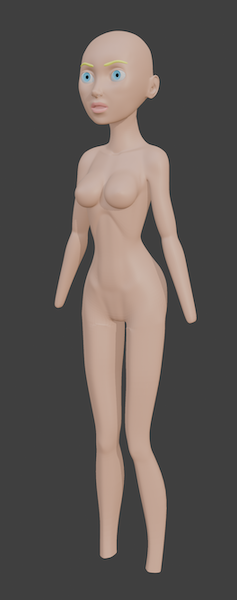
I started making some small adjustments as I could only take so much "creative freedom". I skipped the parts of making her anatomically more correct than necessary, but oversized ice cream cone breasts were the tipping point when I started making adjustments to the best of my abilities.
And my abilities are not that refined yet. One highlight to me was that I could actually start making adjustments and fix things without referencing the tutorial or searching the web. So it appears like I am slowly learning how all of this works. Nice.
iOS / macOS
With the recent version of Xcode releasing agentic editing I thought I should give it a try. I have written a lot Objective-C back in the day. I wrote a good amount of Swift up to Swift 3. So none of this is unknown to me, but I surely do not know the Swift API right now nor what current best practices are or what changed in the last three versions.
Xcode is in a worse state than I have ever seen it. I can force a crash report by clicking in a preview window. And the crash report window freezes Xcode until it crashes.
Qwen 3.5 produced some wonky code that simply does not work and loops between two different errors. One always replacing the other when asked to fix it. I had to manually take care of the async API calls to get it unstuck. Gemini, which I usually use as a control group when I do not trust Qwen, did not fully understand the spec and implemented an HTTP request. Back to Qwen. It appears diagnostics are not sent to the LLM, there is no proper looping which means errors need to be manually clicked on to fix them.
Not wanting to pat my own back, but LazerBunnys coding agent could implement the spec and produce a working app with Qwen 3.5. The LLM and the prompt are the same and the only difference is the agent and tools. I assume Codex etc would have done this successfully as well, the spec was fairly simple and resulted in about 300 lines of Swift.
What worked really well on the other hand was iterating on the UI that is shared between iOS and macOS. I now have an iMessage like chat interface for Endirillia as a native app. Good enough for now.
The iOS app will never be deployed. Apple and their asinine developer account management brought me to a tipping point. More on that in another post.
Progress
I honestly cannot complain. I am hands and feet away from having a body for the avatar. So only a few more days of work to get to weeks of work for the hair (if the length of the tutorial is an indicator).
I will likely iterate a bit on the chat interface for macOS. I never wanted to commercially do development for an Apple platform again and I still stand by it. This little app with the annoying part taken care of by an LLM gives me a simple way to test the multi client functionality of the "brain" though, something that should work well for the time when the avatar is done.
posted on April 12, 2026, 8:20 p.m. in AI, apple, lazerbunny, swift