A bubbly file manager
I was going back and forth for some time how lightweight my shell will be. I ended on the decision to bake everything into the binary I need to be productive, except for some tools too large to reproduce. So Neovim is safe, I will not try to rewrite it on a weekend - what a disappointment for the orange site I visit sometimes. But what certainly made it into the codebase is a file manager.
I often find myself moving a good amount of files around. Sure, I can remember how to use find or install one of the many, great file managers out there. Or I simply write one myself. And take the opportunity to get better at building something with bubbletea.
I decided to go with overlapping panes to give me a visual reminder how deep I am into a directory structure. While it sounds stupid as you can derive this from looking at your path, having this feature helps me on a regular basis on remote systems where files are a big mess. It also helps that my terminal is usually full screen on a 6k display and I got the screen real estate for this. I assume I will have to implement a smarter way to manage panes when using it the first time on my iPad.
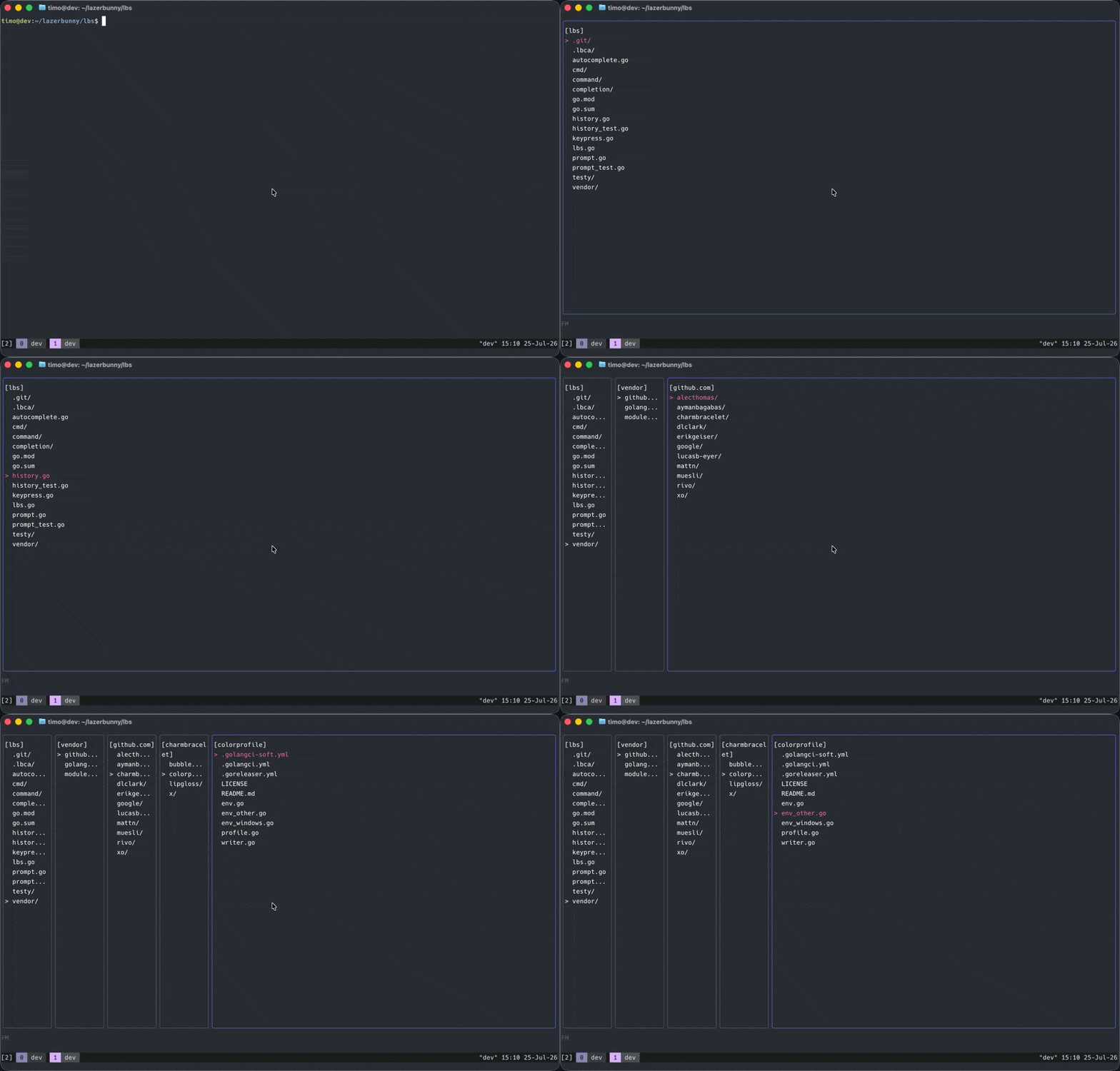
So here we are, I can navigate the filesystem with arrow keys, I can c to copy, x to cut and v to paste. Also d to delete. Without a safety net, we are sticking to our commitment of building unsafe tools… for now. Or until I figure out how to display a nice modal window to confirm an action.
Bubbletea
Bubbletea operates a lot with passing and returning values. Which is kind of fine until you start splitting perfectly working code into multiple files to clean up a bit. Better remember to add a * or return the model after adding or removing a pane, or things will stop working pretty quickly.
Besides that it feels fairly easy to get into bubbletea and lipgloss. While my coding agents TUI was stitched together with trial and error, the file manager is a bit more planned and used as learning material.
But once you get there and start splitting things up, the unwieldy Update() methods you see all over the place suddenly become manageable.
func (m model) Update(msg tea.Msg) (tea.Model, tea.Cmd) {
        mappedKeys := map[string]func(){
                "up":    m.arrowUp,
                "down":  m.arrowDown,
                "right": m.arrowRight,
                "left":  m.arrowLeft,
                "c":     m.keyC,
                "x":     m.keyX,
                "v":     m.keyV,
                "d":     m.keyD,
        }

        switch msg := msg.(type) {
        case tea.WindowSizeMsg:
                m.width = msg.Width
                m.height = msg.Height

        case tea.KeyMsg:
                switch msg.String() {
                case "ctrl+c", "q":
                        return m, tea.Quit
                default:
                        if fn, ok := mappedKeys[msg.String()]; ok {
                                fn()
                        }
                }
        }

        return m, nil
}
hjkl support for navigation is on the way, we cannot have yet another TUI that forces you to move your hand two centimeters to use very easy to understand arrow buttons. We are old, we grew up with vim, we die on the hill that using hjkl makes sense.
Overall the bubbletea ecosystem should help implementing some fun stuff such as markdown previews. Using Ghostty also means I can implement the kitty graphics protocol to display images.
Progress
This was a rather short week to work on LazerBunny. I am working on getting a project ready for its big debut and as most of the time, the last 20% take 80% of the time. I am only 6 months behind the initially planned timeline, but the delay was worth it. I will obviously let you know when it is live. Despite that, the initial code is up. I did not push the refactor or a few more commands, but
posted on July 26, 2026, 7:44 p.m. in golang, lazerbunny